Simple Cron, Scheduled Task & Workflow Monitoring
Get instantly notified the moment your cron job, scheduled task, or n8n, Zapier, and Make workflow goes silent.
Uptime monitoring asks whether a server responds. Doyouok asks whether the job actually ran.
Free plan includes 5 Checks — no credit card required.
Create 5 Free ChecksSetup takes 2 minutes · no credit card · test it with a single curl call.
Monitor Anything That Should Keep Running
Cron Jobs
Make sure your scheduled cron jobs run on time. Get an alert the moment a job stops checking in.
Scheduled Tasks
Monitor Windows Task Scheduler jobs and other scheduled tasks without adding complicated monitoring infrastructure.
n8n, Make & Zapier Workflows
Get alerted when a step in your n8n workflow, Make scenario, or Zapier zap stops running — even if the platform itself doesn't tell you.
Scripts & Background Jobs
Know when a script or background process stops running unexpectedly.
Backups & Data Jobs
Monitor backups, imports, exports, and other automated data jobs.
How It Works
Create a Check
Create a Check for your task and get a dedicated Ping URL.
Send a Check-in
Have your process request this URL every time it runs successfully, or every time the event occurs.
Get Alerted on Timeout
If no check-in arrives within the interval you set, we'll alert you immediately.
See It In Action
A live look at the dashboard — every check's status at a glance, and the full check-in history behind it.
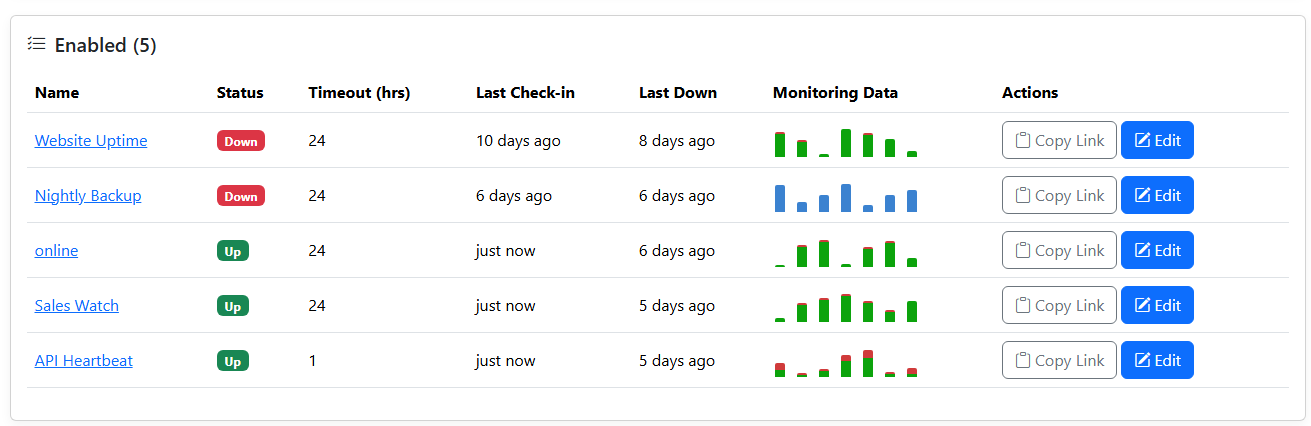
All checks at a glance, with status and recent history
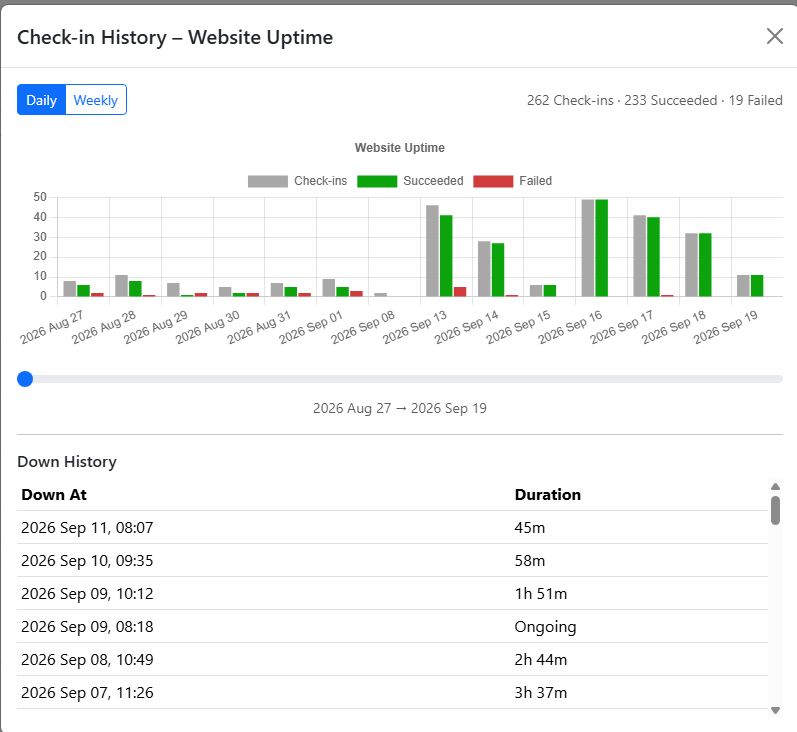
Drill into a single check's check-in history and downtime
Monitor a Cron Job in Seconds
Add one line to any job, script, or workflow — no agent, no SDK to install.
# Ping Doyouok when your job succeeds
curl -fsS --retry 3 --max-time 10 https://ping.doyouok.com/ping/YOUR-API-KEY# Run every hour, then ping Doyouok when it succeeds
0 * * * * /path/to/backup.sh && curl -fsS --retry 3 --max-time 10 https://ping.doyouok.com/ping/YOUR-API-KEYNo Surprises: How Alerting Works
No Hidden Grace Period
The first alert fires the moment your check-in interval elapses — nothing waits quietly in the background.
One Escalating Reminder
Still down? A final reminder goes out once the check has been down for 2x your interval, so it doesn't get lost in a busy inbox.
Works Across Any Time Zone
Intervals are duration-based (e.g. every 6 hours), not clock-based — nothing to configure for time zones or daylight saving.
Automatic Recovery Alerts
The moment a check reports in again, we detect the recovery and notify you — no need to check back manually.
What Sets Us Apart
Start Free, Stay Affordable
Start free with 5 Checks, no credit card required — upgrade for as little as $3/mo when you need more.
Daily Check-in Counts & Trend Reports
See how often each Check checks in and track its trend over time.
Easy to Use
No dashboards to configure, no queries to write — status is clear at a glance.
Built for Reliability
Runs on two servers with load balancing for added reliability.
Key Features
Live Dashboard
See the status and last check-in time of every Check at a glance.
Flexible Intervals
Set a custom check-in interval, in hours, for each Check to match any task schedule.
Clear Status
New / Up / Down — spot problems at a glance.
Instant Alerts
An alert is sent automatically the moment a check-in is missed, so a failing task never fails silently.